
Everything Turgor Exam Engine does, in one place: what is in the free plugin, what Pro adds, and the three add-ons that come with Pro. Use it as a checklist when comparing platforms.
Free: Turgor Exam Engine
Course builder
- Courses, lessons and topics in a drag-and-drop outline.
- Prerequisites and completion rules per course.
- Elementor widgets for course and lesson pages.
Quiz engine
- Single choice, multiple choice, fill in the blank and free-answer questions, all graded automatically.
- Numerical answers accepted within a range (
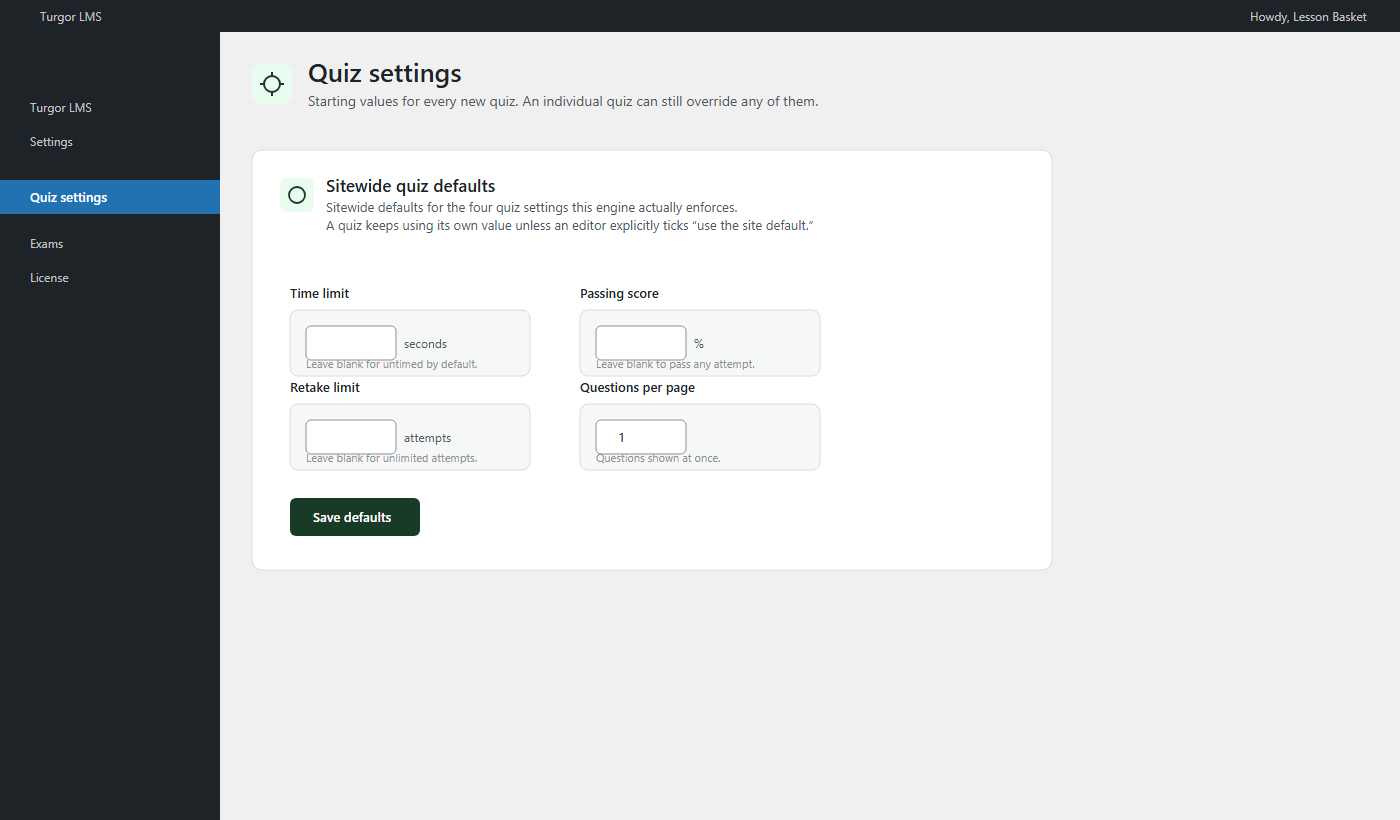
6300..6400), for GATE- and JAM-style keys. - Negative marking, time limits, retake limits and question shuffling, per quiz or as sitewide defaults.
Access and enrolment
- Open courses with no sign-up, one-click free enrolment, or restricted access.
- “Free courses” mode: signed-in students open any free course without clicking Enroll.
- Send Sign in buttons to your own login page or login plugin.
LearnDash migration
- Guided, resumable import of courses, lessons, topics, quizzes, questions, enrolments (including group access), completions and quiz attempts.
- A preflight report before you import, and verification tools afterwards: structure, question fidelity, progress, content, code and URL checks.
- Course, lesson and quiz URLs kept the same after LearnDash is switched off.
Pro: Turgor Exam Engine Pro
Exam Mode
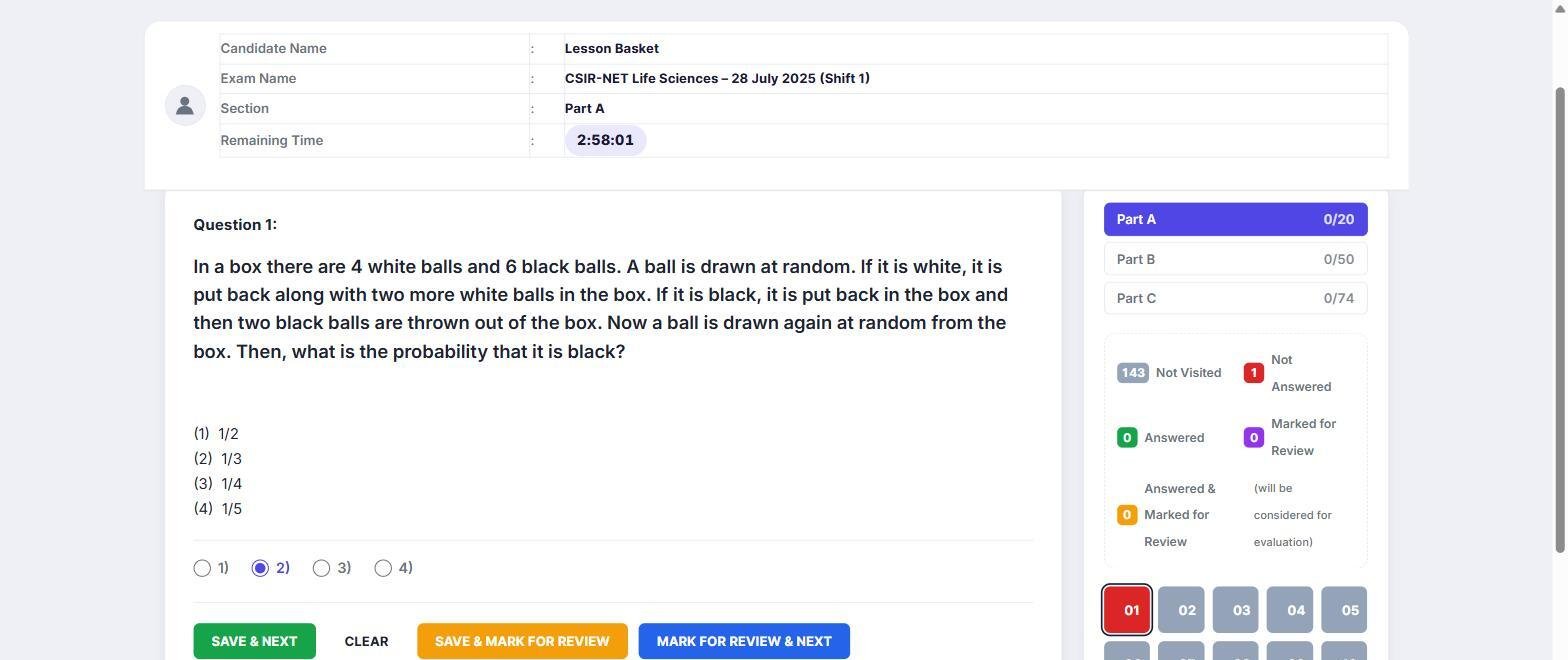
- A CBT exam screen: section tabs, a five-state question palette, Save & Next, Mark for Review.
- A server-side countdown that survives a closed tab and submits at zero.
- Fullscreen lockdown with an allowed number of exits before the exam submits itself.
- Negative marking per section and per question; “evaluate first N answered” per section.
- A limit on questions per section, shuffled order, and the option to keep one order across retakes.
- Passing percentage, exam instructions, light/dark themes and your own accent colour.
- Saved exam formats you reuse across a test series.
- Results with topic-wise breakdown, class average, percentile, explanations, score trend across retakes, and an optional print / save-as-PDF button.
- Shortcodes:
[lem_exam id="…"]for a paper,[lem_history]for a student’s past attempts.
Student Dashboard

- One shortcode,
[lb_student_dashboard]. - Per-course scores, percentiles, quiz and site streaks, an activity heatmap, and exam history.
- An automatic list of lessons to revisit, for any lesson averaging under 60%.
- Dark, light and automatic themes.
Quiz Toolkit
- Bulk import and export from Excel, CSV, Word, JSON and live Google Sheets that re-sync on a schedule.
- Negative marks, sections, explanations and per-option marks in the import file.
- LaTeX rendered through MathJax.
Selling courses
- WooCommerce one-time purchases and subscriptions; access follows the order.
- Products that bundle several courses at one price.
- Access length in days, or one fixed calendar window for everyone; “Extend access” for a whole Product or one student.
- Google Play Billing, so an Android app can sell the same course.
- A course catalog,
[tg_courses]: every Product and course with its price (including WooCommerce sale prices) and an Add to cart button for WooCommerce products.
Reports, feedback and certificates
- Class reports: completion rate, average score and a roster showing where each student stopped.
- Time-spent and continue-learning shortcodes.
- Star ratings and reviews on course pages; “report a problem” under lessons and quiz questions, in one queue.
- PDF certificates issued automatically on completion and emailed to the student; Elementor Certificate and My Courses Grid widgets.
Built for real exam patterns
Everything a coaching institute asks for
The checklist institutes send us before they switch, and how Turgor Exam Engine covers each item.
| Your requirement | Turgor Exam Engine |
|---|---|
| Create courses and lessons | Yes Free Drag-and-drop course builder with lessons, videos and quizzes. |
| Divide an exam into sections | Yes Free Name each section and assign questions to it. |
| Shuffle questions within each section | Yes Free Shuffling never mixes sections, so the paper keeps its structure. |
| Draw a set number of questions from each section | Yes Exam Mode Question limit per section, picked fresh for every attempt. |
| Different marks for each section | Yes Exam Mode For example +1 in one section and +2 in another. |
| Different negative marking for each section | Yes Exam Mode Turn it on or off and set the deduction section by section. The free plugin sets it per quiz or per question. |
| A separate timer for each section | Yes Exam Mode Each section closes when its time runs out, as in SSC CGL and IBPS PO. |
| Sectional cut-off marks | Yes Exam Mode A minimum score per section, in marks or as a percentage. |
| “Only the first N answers count” (CSIR NET rule) | Yes Exam Mode Set how many answered questions are evaluated in each section. |
| Section-wise results | Yes Exam Mode Score, correct, wrong and skipped for every section, plus answer-by-answer review. |
| Questions in English plus another language | Yes Exam Mode Add a second language to any question, such as Hindi, Tamil, Bengali or Marathi. Students switch between the two during the exam. |
| A real computer-based exam screen with question navigation | Yes Exam Mode Question palette, mark for review, countdown and a GATE-style calculator. |
Free in Turgor Exam Engine on WordPress.orgExam Mode needs the Exam Mode add-on (Pro)
See Exam Mode in action
Two real past papers running on LessonBasket, a live exam site built with Turgor Exam Engine.
CSIR NETCSIR NET Life Sciences, December 2025
- Parts A, B and C as separate tabs
- Attempt any 15, 35 and 25: only those answers count
- Different marks and negative marking for each part
- Fullscreen exam screen with question palette
- General Aptitude, Chemistry and five optional sections
- 122 questions in one full-length paper
- Question palette and mark for review
- Fullscreen exam screen with a countdown timer
Opens on lessonbasket.com. Log in there to start a paper.
Pricing
| Plan | Price | Sites | Updates |
|---|---|---|---|
| Turgor Exam Engine | Free | Unlimited | — |
| Pro Single Site | $59 one-time | 1 | 2 years; features keep working after |
| Pro Agency Starter | $109 one-time | Up to 5 | 2 years; features keep working after |
| Pro Agency Unlimited | $349 per year | Unlimited | While subscribed, plus priority support |
What it does not do yet
So you can plan around it: one timer covers the whole exam (no per-section timers yet), and there are no assignments or hand-graded essays. Both are on the roadmap; the changelog lists every release.