
Load a year’s worth of questions in an afternoon.
Quiz Toolkit imports and exports LearnDash quiz questions and answers via Excel, JSON, Word, and a live Google Sheets or Google Docs sync — so your question bank doesn’t have to be built one question at a time in wp-admin.
Formats supported
Excel (.xls), Word (.docx), JSON, and live Google Sheets or Google Docs sync — import and export in the same formats.
What importing questions actually looks like
Real screenshots from a live LearnDash site running Quiz Toolkit — the bulk import screen and the plain-text Word doc import format.
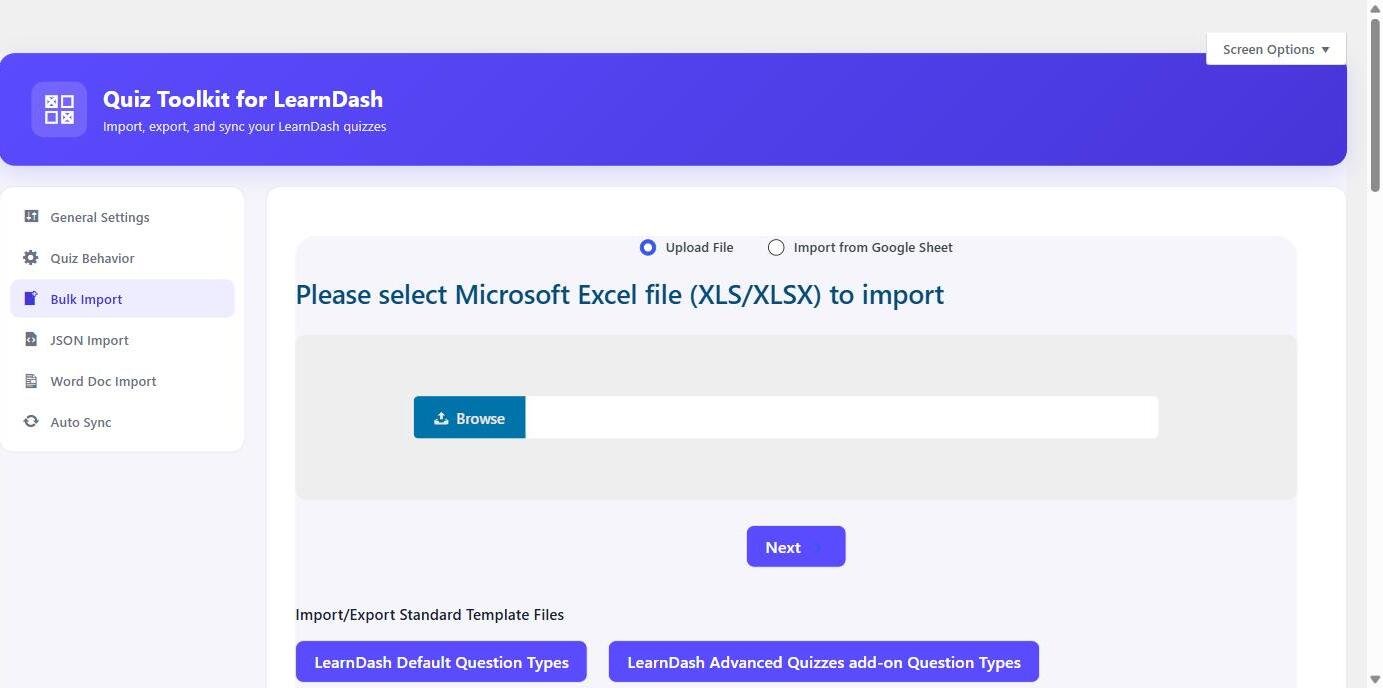
The bulk import screen
Drop in an Excel file or point at a Google Sheet and questions land in the right quiz automatically.
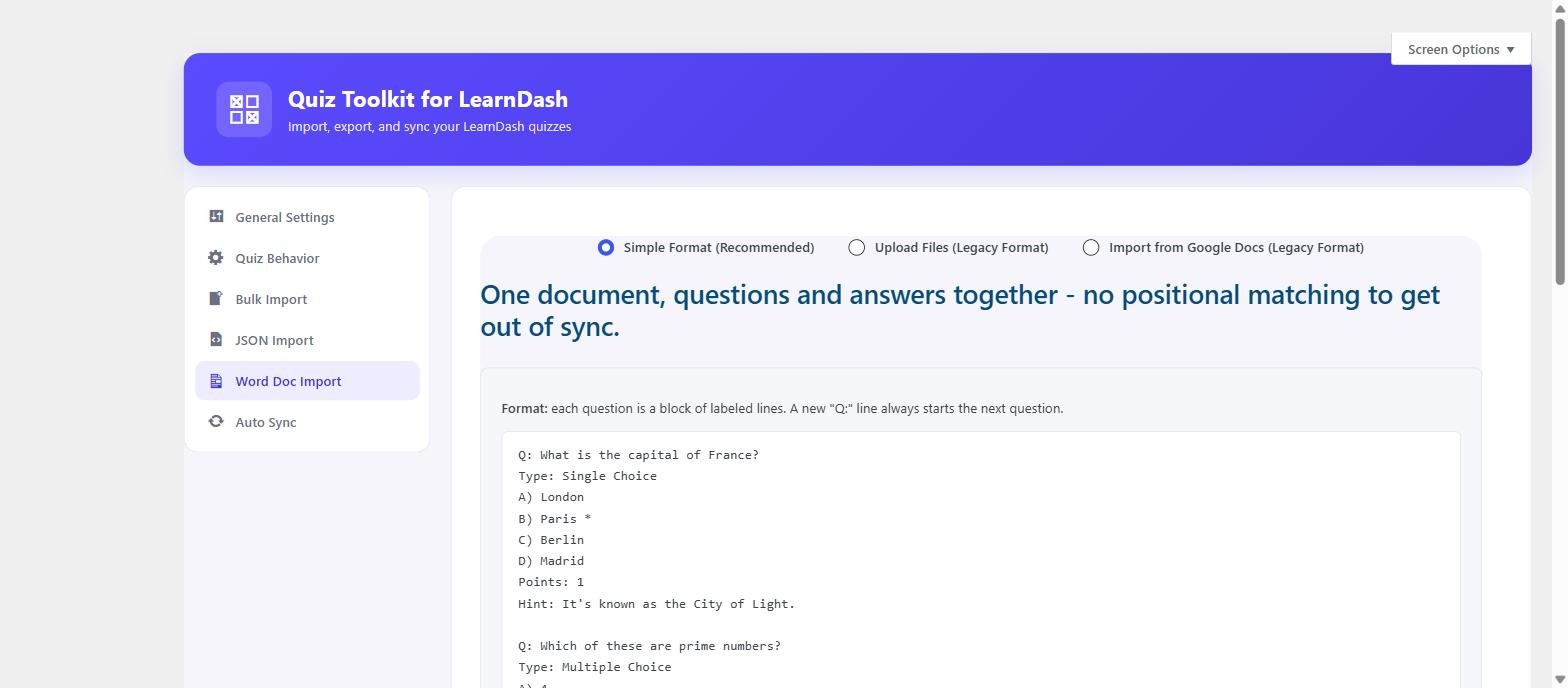
The Word doc import format
Paste plain-text questions in a documented Q: / Type: / A) / Points: / Hint: format straight from a Word doc.
Import from wherever your questions already live
Bulk import and export, plus live syncing from Google Sheets or Docs.
Excel, Word & JSON
Bulk import from Excel (.xls), Word (.docx), or JSON — and export back out to the same three formats, for backup, editing, or moving a question bank between sites.
Live Google Sheets sync
Point it at a shared sheet and edits made there flow into your LearnDash quiz, either on a schedule (hourly, every 6 hours, every 12 hours, or daily) or on demand with a manual “Sync Now” button.
Live Google Docs sync
The same scheduling options, for teams that maintain question banks as documents rather than spreadsheets.
Re-import without duplicates
Re-importing the same source updates existing questions in place instead of creating duplicates, so a maintained sheet or doc can be synced repeatedly as it’s edited.
Every native LearnDash question type
Full coverage of LearnDash’s own types, plus Advanced Quiz add-on types when active.
Native LearnDash types
Full support for LearnDash’s own question types: single choice, multiple choice, free answer, sorting, matrix sort, cloze (fill-in-the-blank), and assessment.
Advanced Quiz add-on types
When LearnDash’s Advanced Quiz add-on is active, Quiz Toolkit also imports its extra types: jumbled sentence, swipe questions, calculated formula, jumble drag-and-drop sentence, and audio questions.
Per-question point values
Questions in the same quiz can carry different weight instead of scoring uniformly.
Multi-category tagging
Multi-category tagging per question during import, for question banks organized by subject or topic.
LaTeX support
LaTeX equations in question and answer text render correctly on import via MathJax — built for math- and quant-heavy question banks.
Built for teams managing a real question bank
Auto-publish controls, cleanup options, and logs for tracking what changed.
Auto-publish toggle
Auto-publish toggle for imported quizzes, so a sync can go straight live or stay in draft for review.
Configurable cleanup on re-run
Choose what an import removes on re-run: nothing, the quiz’s existing questions only, or the underlying question-bank entries as well.
Shared question banks
Reuse an existing shared question bank across quizzes instead of duplicating questions per quiz.
Activity & debug logs
Activity log and debug log for tracking what an import or sync actually changed.
Frontend docx export
Optional frontend docx export, for generating a printable Word version of a quiz’s questions.
Frequently asked questions
What question types does this actually support?
Every native LearnDash question type — single choice, multiple choice, free answer, sorting, matrix sort, cloze, and assessment — plus the LearnDash Advanced Quiz add-on’s extra types (jumbled sentence, swipe questions, calculated formula, jumble drag-and-drop sentence, audio questions) when that add-on is active.
Does Google Sheets sync require me to re-import manually every time I edit the sheet?
No — you can schedule sync to run automatically (hourly, every 6 hours, every 12 hours, or daily), or trigger it manually with a “Sync Now” button whenever you want an immediate update.
If I re-import the same sheet after fixing a typo, will it duplicate the question?
No. Re-importing the same source updates the matching existing question in place rather than creating a duplicate.
Does it handle math and equations?
Yes — LaTeX equations in your source file render correctly via MathJax once imported.
Questions before you buy?
Email us or reach out through the contact page — happy to talk through whether Quiz Toolkit fits your question bank.