
If you run mock tests or a test series on LearnDash, you have probably hit the same walls: quizzes that feel like end-of-chapter checks rather than an exam, negative marking that needs workarounds, and a growing list of add-ons to renew every year. This page compares LearnDash with Turgor Exam Engine feature by feature, including the places where LearnDash is still ahead.
Disclosure: we make Turgor Exam Engine, and we are not affiliated with LearnDash LLC. We try to be fair, but check any claim against LearnDash’s own documentation.
The short answer
- Stay on LearnDash if your main product is video courses and you already use many of its integrations.
- Switch to Turgor Exam Engine if timed, negative-marked mock tests are the core of your business.
At a glance
| LearnDash | Turgor Exam Engine | |
|---|---|---|
| Free version | No (48-hour trial) | Yes |
| Paid pricing | $259–$599 per year | Pro from $59 one-time |
| If you stop paying | Updates and support stop | Pro keeps working; only updates stop |
| Courses, lessons, topics, quizzes | Yes | Yes |
| Timed, sectioned CBT exam screen | Not built in | Built in (Pro) |
| Negative marking per section and per question | Not built in | Built in (Pro) |
| “Evaluate first N answered” (CSIR-NET, GAT-B) | Not built in | Built in (Pro) |
| Numerical answers within a range (GATE, JAM) | Not built in | Built in |
| Class average and percentile per attempt | Not built in | Built in (Pro) |
| Bulk import from Excel, Word, Google Sheets | Needs an add-on | Built in (Pro) |
| Certificates | Yes | Yes (Pro, issued automatically on completion) |
| Assignments and essay grading | Yes | Not yet |
| Add-on ecosystem | Very large | Small |
| Import from LearnDash | — | Guided import with verification |
Where Turgor Exam Engine is ahead
A real exam screen
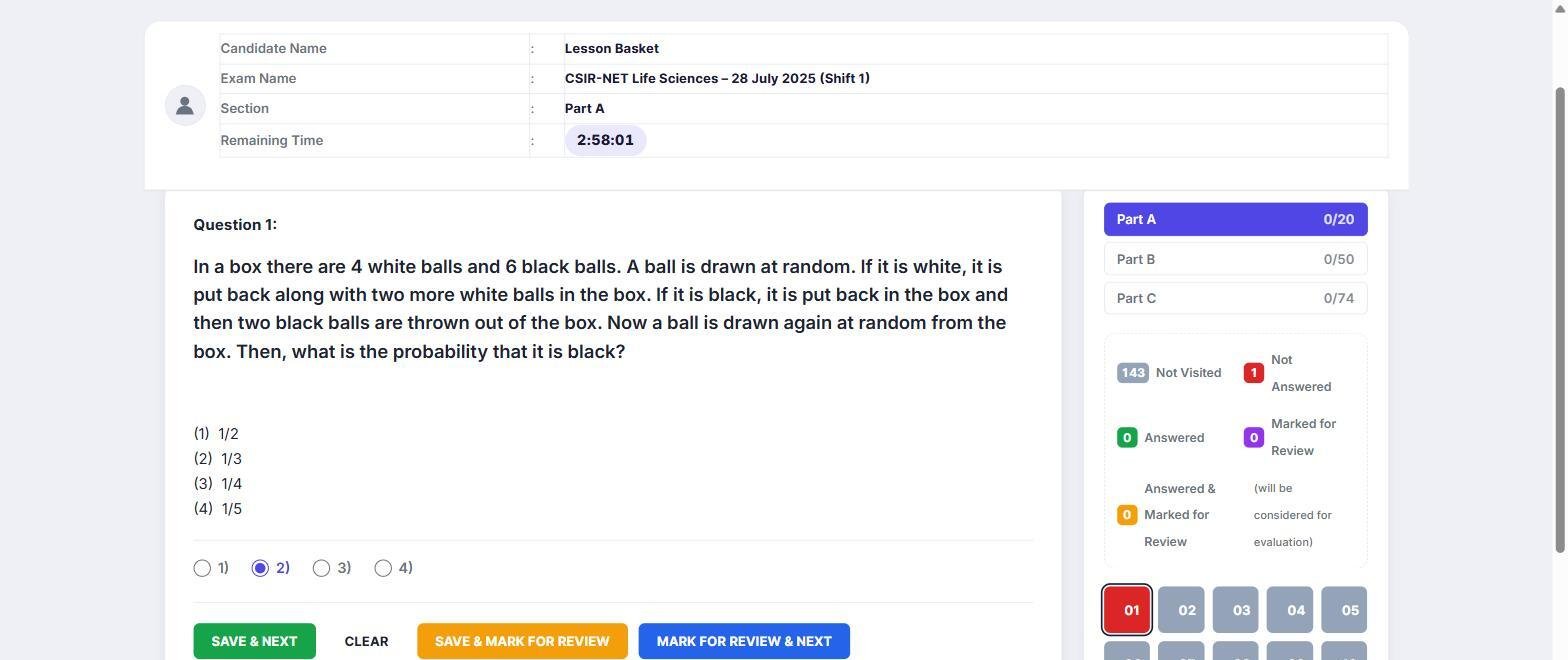
Students see the screen they will meet on exam day: topic tabs for each section, a question palette showing answered, not answered, not visited, marked for review and answered-and-marked, Save & Next and Mark for Review buttons, and a timer that keeps running on the server if the page is closed and submits the paper at zero. Fullscreen can be required, and the exam submits itself after the number of fullscreen exits you allow.
Marking that matches the real paper
- A different penalty per section, for example −0.25 in one section and −0.5 in another.
- A per-question penalty that overrides the section’s, for sections that mix MCQs with zero-penalty numerical questions.
- “Evaluate first N answered” per section, so a student who answers 20 questions in a part that grades 15 is marked on the first 15.
- An optional limit on how many questions each section shows, shuffled order, and the option to keep the same shuffled order across retakes.
Results students understand
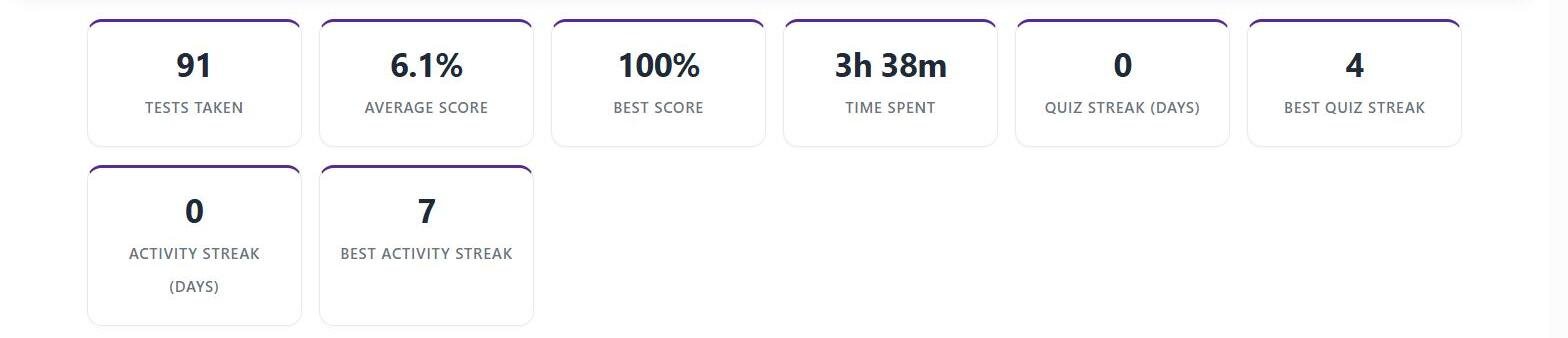
An instant result with score, topic-wise breakdown, class average and percentile (once at least two attempts exist), per-question explanations, and a score trend across retakes. The Student Dashboard adds per-course scores, streaks, an activity heatmap and a list of lessons to revisit.
A price that stops
Single Site ($59) and Agency Starter ($109, five sites) are one-time purchases with two years of updates. When the two years end, every feature keeps working; you only stop getting updates until you renew. Agency Unlimited ($349 per year) is the one subscription plan.
Where LearnDash is still ahead
- Ecosystem. LearnDash has years of third-party add-ons, themes and integrations. If your site depends on one of them, check for an equivalent before switching.
- Assignments and essays. LearnDash supports uploaded assignments and hand-graded essays. Turgor Exam Engine does not yet, and those records stay in LearnDash after a migration.
- Track record. LearnDash has been around far longer. Turgor Exam Engine is newer, though it already runs 26 real previous-year papers on lessonbasket.com.
Switching
The import reads LearnDash and copies; nothing is changed on your live site until you choose to switch, and your course, lesson and quiz URLs stay the same. See how to migrate from LearnDash for the full process, or how lessonbasket.com runs 26 real exam papers on Turgor Exam Engine.
What the import brings across
Courses, lessons, topics, quizzes, questions, categories and enrolments, plus completions and quiz attempts. Each course is checked against the original, and nothing is deleted from LearnDash. Pro also migrates groups, bundles and WooCommerce products. Certificates already issued, assignments and essays stay in LearnDash.
Before you migrate
- Back up your whole site.
- Test the import on a staging copy.
- Compare a sample of questions by hand.
- Keep LearnDash active until students have moved.
The LearnDash migration checklist covers each step in detail.
A low-risk way to try it
Install the free plugin on a staging site, import one course, and run a mock test. If it does not suit you, you have lost an afternoon.
Frequently asked questions
Can Turgor Exam Engine run alongside LearnDash?
Yes. Install it, run the import, and keep LearnDash serving your site while you check the result. You switch over when you are ready, and you can switch individual pages over one at a time.
Do I need LearnDash installed to use Turgor Exam Engine?
No. It is a standalone course platform. LearnDash only matters if you are importing from it.
Is there a money-back guarantee?
Yes, 30 days on every Turgor Labs purchase.
Related guide: Best LearnDash alternatives in 2026, compared