
LearnDash is the best-known course plugin for WordPress, and for a long time it was the default choice. In 2026 it is also one of the more expensive ones: every plan renews every year, there is no free version, and sites that run competitive-exam style tests usually end up adding more plugins on top. If you are weighing a switch, this guide compares the main alternatives on what actually matters: price over three years, exam features, and how hard it is to move your existing courses and students.
Disclosure: we make Turgor Exam Engine, one of the plugins below. We have tried to be fair, quoted every price from the vendor’s own pricing page (checked October 2026), and said where another plugin is the better fit.
The short answer
- For mock tests, test series and competitive exams (SSC, banking, UPSC, NEET, JEE, CSIR-NET, GATE): Turgor Exam Engine. Sectioned CBT exams, negative marking per section and per question, percentiles and a guided LearnDash import are built in.
- For a general course business on a budget: Tutor LMS or LifterLMS. Both have a capable free core and a large add-on ecosystem.
- If you are already deep in WooCommerce and want something simple: Sensei LMS, made by Automattic.
- If you rely on LearnDash-specific add-ons that have no equivalent elsewhere: stay on LearnDash, at least until those add-ons are replaced.
LearnDash alternatives compared
| Plugin | Free version | Paid pricing (official, Oct 2026) | Best for |
|---|---|---|---|
| LearnDash | No (48-hour trial) | $259 / $399 / $599 per year, one site per licence | Established course sites with LearnDash add-ons |
| Turgor Exam Engine | Yes: courses, lessons, quizzes, LearnDash import | Pro from $59 one-time (1 site), $109 one-time (5 sites), $349 per year (unlimited) | Mock tests, test series, competitive-exam coaching |
| Tutor LMS | Yes | $199 / $399 / $799 per year, or $499 / $999 / $1,999 lifetime | All-round course sites, front-end course building |
| LifterLMS | Yes | $199 / $299 / $799 per year (first year 50% off at the time of writing) | Membership and course businesses |
| Sensei LMS | Yes | Paid Sensei Pro plan | Simple courses on WooCommerce stores |
| LearnPress | Yes | Paid add-ons and bundles | Large free ecosystem, education themes |
What a LearnDash exam site really costs
The licence is only part of the bill. A coaching institute that wants a real exam experience on LearnDash typically needs a timed, sectioned exam screen with negative marking, a student results dashboard, and a way to bulk-import thousands of questions from Excel. On LearnDash those are separate plugins, each with its own renewal. Over three years the difference adds up quickly:
| Over 3 years, one site | LearnDash Essentials | Turgor Exam Engine Pro |
|---|---|---|
| Core licence | $259 × 3 = $777 | $59 once |
| Exam screen, negative marking, percentiles | Add-on or custom work | Included |
| Bulk question import (Excel, Word, Google Sheets) | Add-on | Included |
| Student results dashboard | Add-on | Included |
| If you stop paying | Updates and support stop | Every feature keeps working; only updates stop after 2 years |
The alternatives in more detail
1. Turgor Exam Engine: built for exams
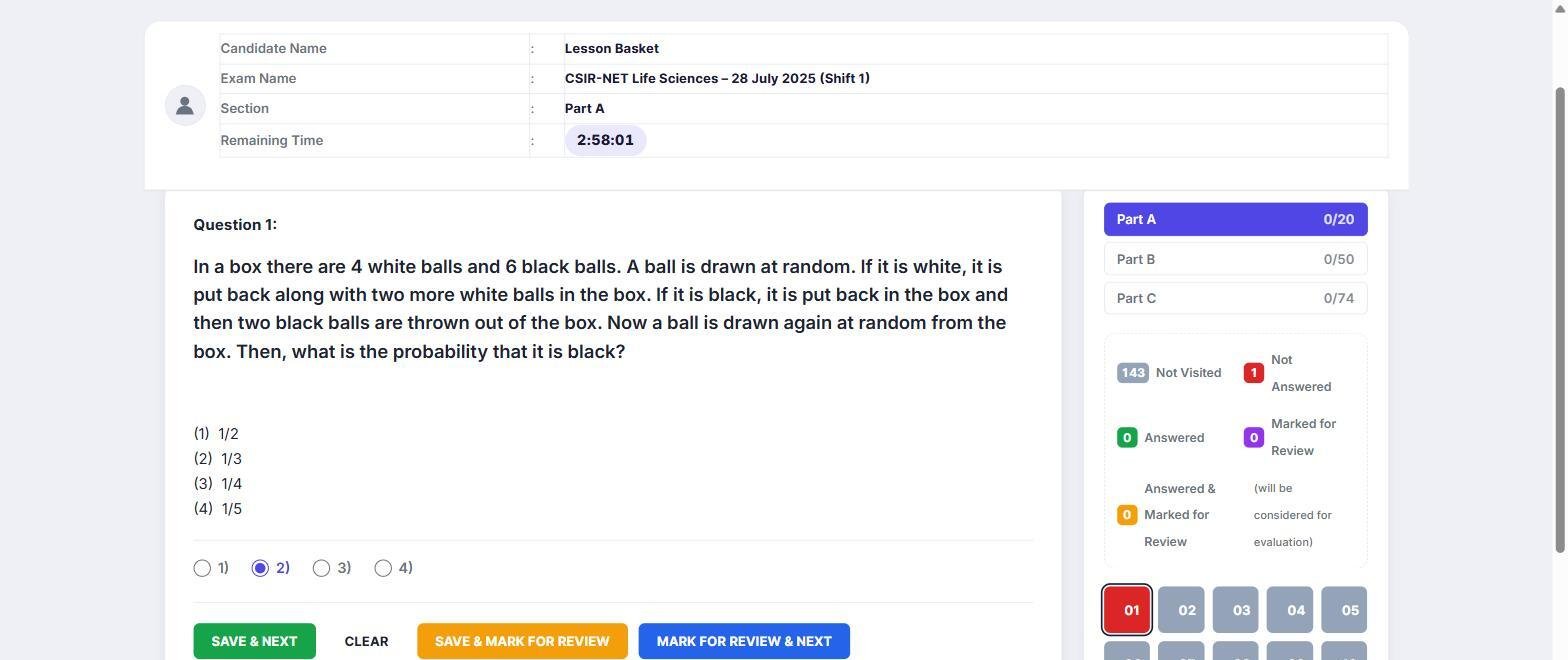
Turgor Exam Engine is a complete course platform (courses, lessons, topics, quizzes, enrolment) whose Pro version adds a computer-based-test screen of the kind students meet in SSC, banking and NTA exams: a question palette with answered, not answered, not visited and marked-for-review states, a countdown timer kept on the server, fullscreen lockdown, and a result screen with class average and percentile.
- Negative marking per section, and per question when a section mixes question types (as GATE does).
- “Evaluate first N answered”, for papers like CSIR-NET that only grade a fixed number of attempts per part.
- Numerical answers accepted within a range (written
6300..6400), for GATE and JAM keys. - Bulk import from Excel, CSV, Word, JSON and live Google Sheets, with LaTeX rendered through MathJax.
- A guided LearnDash import that checks its own work before you switch LearnDash off (more below).
- Pro is a one-time purchase on Single Site and Agency Starter: it keeps working after the 2-year update window ends.
Where it is not the best fit: it is a younger plugin with a smaller add-on ecosystem than LearnDash or Tutor LMS. It does not yet have per-section timers (one timer covers the whole paper), and LearnDash assignments, essays and certificates do not migrate.
2. Tutor LMS
Tutor LMS has a generous free core, a front-end course builder that instructors like, and an AI course-building feature in Pro. It is a strong general-purpose choice, and it is one of the few to offer a lifetime licence. Its quizzes are built for course assessment rather than competitive-exam simulation.
3. LifterLMS
LifterLMS is the plugin most often compared with LearnDash for course and membership businesses. The free core is complete enough to start; the paid bundles add payment gateways, integrations and engagement features. Like LearnDash, it renews every year.
4. Sensei LMS
Sensei is made by Automattic, the company behind WordPress.com and WooCommerce. It is simple, block-based and works naturally with a WooCommerce store, which makes it a sensible choice for a store that wants to add a few courses.
5. LearnPress
LearnPress has a free core and a large catalogue of paid add-ons and education themes. It suits sites that want to assemble exactly the features they need from many small pieces.
How to choose
- Do your students sit timed mock tests with negative marking? Pick a platform where that is built in, not bolted on.
- How many questions do you have? If the answer is thousands, bulk import from Excel or Google Sheets matters more than any course-builder feature.
- What does it cost in year three? Add up every add-on you would need, not just the core licence.
- Can you leave LearnDash without losing students? Check what the migration carries: enrolments, progress and quiz history are the parts students notice.
Moving off LearnDash
Turgor Exam Engine reads your LearnDash data and copies it, so your live site keeps running on LearnDash until you choose to switch. Courses, lessons, topics, quizzes, the full question bank, enrolments, completions and quiz attempts come across, and your course and lesson URLs stay the same. The full walkthrough is in how to migrate from LearnDash, and the LearnDash migration checklist lists what to test before you switch.
Frequently asked questions
Is there a free alternative to LearnDash?
Yes. Turgor Exam Engine, Tutor LMS, LifterLMS, Sensei LMS and LearnPress all have a free core plugin. LearnDash itself has no free version, only a 48-hour trial.
Which LearnDash alternative is best for mock tests and test series?
One with a real exam mode: sections, negative marking per section, a CBT question palette and percentiles. That is the gap Turgor Exam Engine was built to fill; most general LMS plugins treat quizzes as end-of-lesson checks.
Will I lose my students if I leave LearnDash?
Not with a migration that carries enrolments and progress. Turgor Exam Engine imports enrolments (including access granted through LearnDash groups), lesson, topic and quiz completions, and past quiz attempts.
Is Turgor Exam Engine faster than LearnDash?
We don’t claim that. When we measured our own endpoints against LearnDash’s on a real site, two were modestly faster and one was level. Choose it for the exam features and the price, not for speed.
Related guide: LearnDash vs Turgor Exam Engine: Which Is Better for Mock Tests and Exam Prep?