
A mock test website is the single most useful thing a coaching institute or test-series seller can put online. Students practise on the same kind of screen they will face on exam day, you see exactly where each of them is weak, and the papers you have already written start earning beyond the classroom. This guide shows how to build one on WordPress, from an empty site to students sitting a timed paper with negative marking.
What a good mock test site needs
- A CBT-style exam screen: question palette, Save & Next, Mark for Review, section tabs and a visible countdown.
- The exam’s own marking: marks per question, negative marking per section, and rules such as “only the first N answers count”.
- A timer students can’t cheat: kept on the server, not in the browser, so refreshing or closing the tab doesn’t reset it.
- Instant results with rank: score, topic-wise breakdown, class average and percentile.
- Bulk question import: nobody types 2,000 questions into a web form.
- Payments and access: sell single papers, full test series or bundles.
Built for real exam patterns
Everything a coaching institute asks for
The checklist institutes send us before they switch, and how Turgor Exam Engine covers each item.
| Your requirement | Turgor Exam Engine |
|---|---|
| Create courses and lessons | Yes Free Drag-and-drop course builder with lessons, videos and quizzes. |
| Divide an exam into sections | Yes Free Name each section and assign questions to it. |
| Shuffle questions within each section | Yes Free Shuffling never mixes sections, so the paper keeps its structure. |
| Draw a set number of questions from each section | Yes Exam Mode Question limit per section, picked fresh for every attempt. |
| Different marks for each section | Yes Exam Mode For example +1 in one section and +2 in another. |
| Different negative marking for each section | Yes Exam Mode Turn it on or off and set the deduction section by section. The free plugin sets it per quiz or per question. |
| A separate timer for each section | Yes Exam Mode Each section closes when its time runs out, as in SSC CGL and IBPS PO. |
| Sectional cut-off marks | Yes Exam Mode A minimum score per section, in marks or as a percentage. |
| “Only the first N answers count” (CSIR NET rule) | Yes Exam Mode Set how many answered questions are evaluated in each section. |
| Section-wise results | Yes Exam Mode Score, correct, wrong and skipped for every section, plus answer-by-answer review. |
| Questions in English plus another language | Yes Exam Mode Add a second language to any question, such as Hindi, Tamil, Bengali or Marathi. Students switch between the two during the exam. |
| A real computer-based exam screen with question navigation | Yes Exam Mode Question palette, mark for review, countdown and a GATE-style calculator. |
Free in Turgor Exam Engine on WordPress.orgExam Mode needs the Exam Mode add-on (Pro)
See Exam Mode in action
- Parts A, B and C as separate tabs
- Attempt any 15, 35 and 25: only those answers count
- Different marks and negative marking for each part
- Fullscreen exam screen with question palette
- General Aptitude, Chemistry and five optional sections
- 122 questions in one full-length paper
- Question palette and mark for review
- Fullscreen exam screen with a countdown timer
Step 1: Set up WordPress and the plugins
Any good WordPress host works; the plugin needs WordPress 6.7+ and PHP 8.1+. Install the free Turgor Exam Engine (courses, lessons, quizzes) and Turgor Exam Engine Pro, which adds the exam screen, Quiz Toolkit for bulk import and the Student Dashboard. Pro starts at $59 one-time for one site.
Step 2: Load your question bank
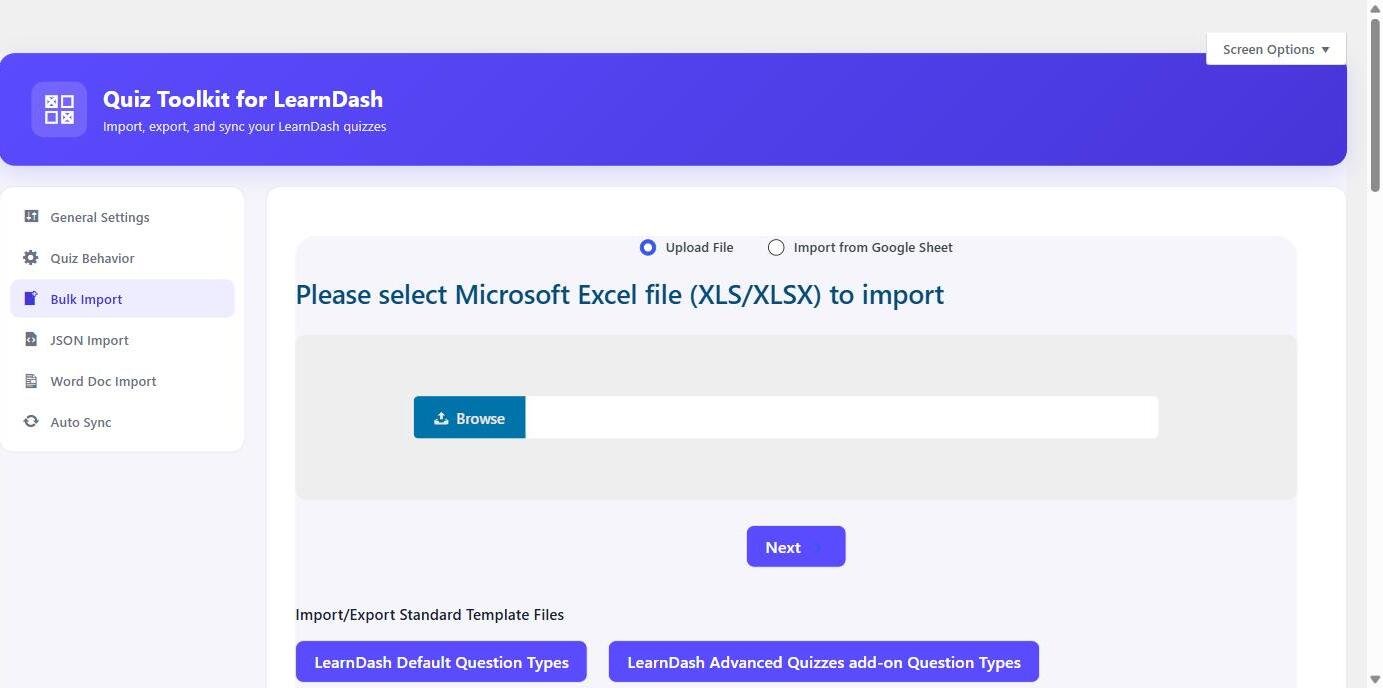
Prepare one spreadsheet per paper with a row per question: the question text, its options, which option is correct, its marks and its negative mark. Put each question’s section in the Category column; sections become the exam’s topic tabs. Import it with Quiz Toolkit from Excel, CSV, Word, JSON or a live Google Sheet. LaTeX in questions and options renders through MathJax, so maths and chemistry papers import cleanly. The import guide has the exact columns.
Step 3: Build the exam
Create an exam and choose how it gets its questions: one quiz whose categories become the sections, or several quizzes, each becoming one section. Then set:
- The overall duration (one timer covers the whole paper).
- Negative marking for each section: marks deducted per wrong answer.
- “Evaluate first N answered” for sections that grade a capped number of attempts.
- Optionally, a maximum number of questions per section, and whether question order is shuffled.
- Passing percentage, the instructions students read before starting, and whether fullscreen is required.
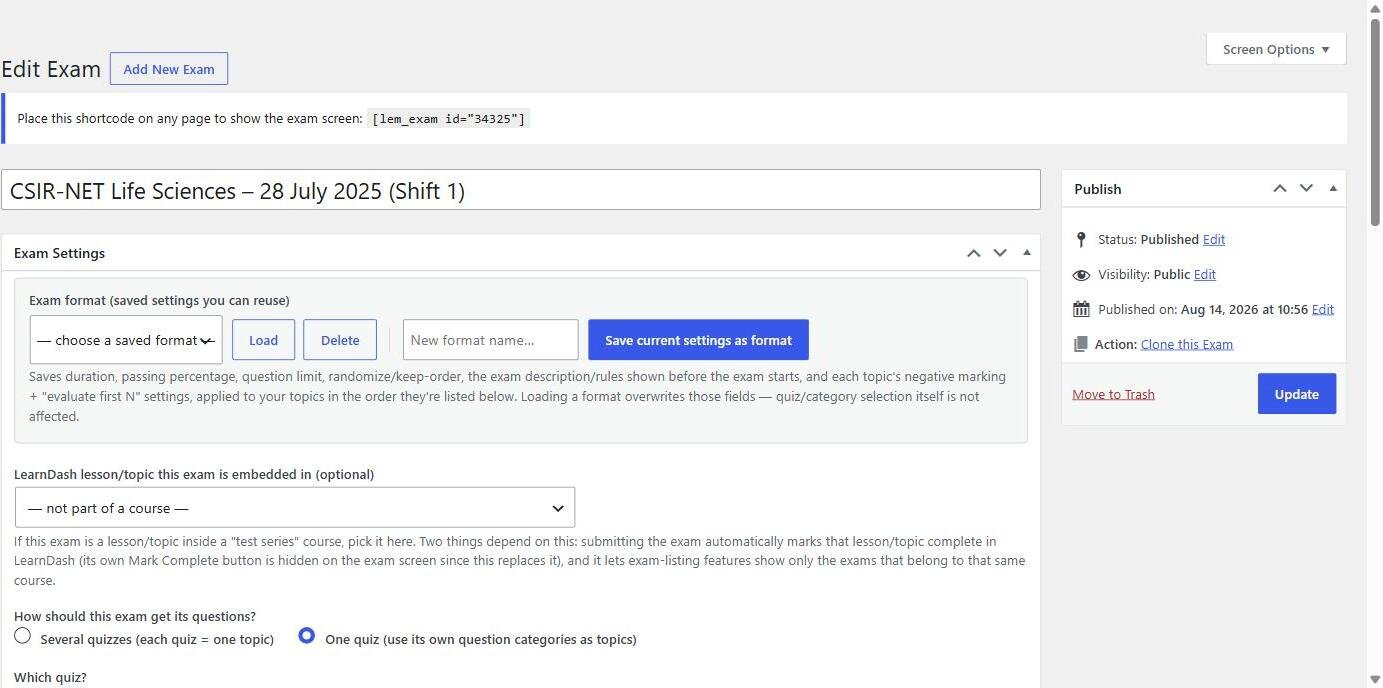
Save the setup as a format and reuse it for every paper in the series, so the 20th mock takes a minute to configure.
Step 4: Publish it
Put the exam shortcode, [lem_exam id="…"], on any page or inside a lesson, and [lem_history] on a page where students see their past attempts. Add [lb_student_dashboard] to a “My dashboard” page for scores over time, streaks and a list of weak lessons.
Step 5: Sell access
Turgor Exam Engine Pro sells through WooCommerce, so any payment gateway WooCommerce supports works, including the Indian gateways that have WooCommerce plugins. Sell one paper, a full test series as a bundle, or a subscription; access is granted and removed automatically as orders change. You can also give everyone the same fixed access window, for example until the exam date.
What students see
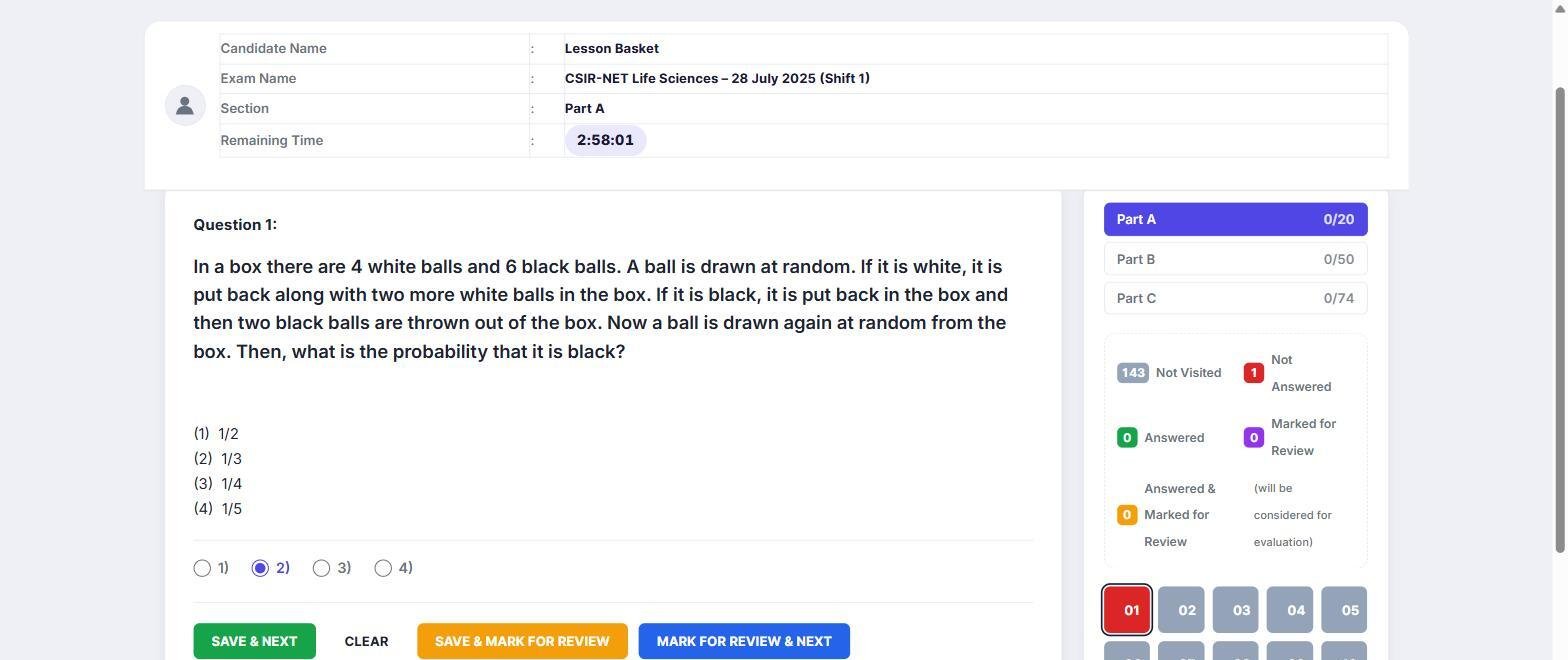
- A question palette with five states: answered, not answered, not visited, marked for review, and answered & marked.
- A timer that keeps running if the page is closed and submits the paper automatically at zero.
- Fullscreen lockdown: leaving fullscreen is logged and the exam submits itself after the number of exits you allow.
- An instant result with score, topic-wise breakdown, class average, percentile and explanations.
Exam-by-exam setups
Every exam scores differently. These guides give the current pattern and the exact settings: SSC CGL, IBPS PO, UPSC Prelims, NEET UG, JEE Main, CSIR-NET and GATE.
Frequently asked questions
Can I create a mock test website without coding?
Yes. Everything above is done in wp-admin: import a spreadsheet, fill in the exam settings, and paste a shortcode onto a page.
Does it support per-section timers like SSC CGL 2026?
Not yet. Today one timer covers the whole paper and students can move between sections freely. To practise sectional timing, publish each section as its own short timed exam.
How many questions can it handle?
Thousands. The import works in batches, and the LearnDash importer was built against a real bank of 27,035 questions.
Related guide: Fullscreen Exam Mode: Reducing Cheating in Online Mock Tests