
The lightweight LMS that outruns LearnDash.
Turgor LMS is a course platform built for speed — analytics, exam tools, and certificates built in from day one, plus a one-click importer that moves your existing LearnDash courses over in minutes, not a weekend.
Requirements
WordPress 6.x. Works entirely standalone — LearnDash is only relevant if you're migrating an existing LearnDash site across.
Your LMS shouldn't be the reason your site is slow.
Most WordPress course plugins were built for 2015-era hosting and never rebuilt. Every quiz attempt writes a dozen extra database rows. Every dashboard load queries tables that were never indexed for it. And setup means picking through forty settings pages before you can publish a single lesson. You didn't sign up to become a database administrator — you signed up to teach.
Everything a course platform needs. Nothing it doesn't.
Student analytics that actually render.
Live Chart.js dashboards — completion trends, score distributions, engagement heatmaps — pulled straight from your course data, no CSV exports or third-party BI tool required.
Built lean, stays fast.
A fraction of the database footprint of legacy LMS plugins, with no bloated admin framework loading on every page request.
Leave LearnDash in one click.
Point the importer at your existing install. Courses, lessons, quizzes, questions, and student progress come over verified — not just copied and hoped for.
Live in one afternoon.
Sensible defaults out of the box. No forty-tab settings maze before your first course goes live.
Plays well with your stack.
Works with the caching and page-builder plugins you already run — nothing to disable, nothing to work around.
100% working migration from LearnDash
A guided wizard imports everything LearnDash has, checks it against the original data, then switches every route to Turgor LMS — in that order, so nothing goes offline mid-migration.
One-click import wizard
Point it at your existing LearnDash install and it imports courses, lessons, quizzes, questions, categories, and enrollments in one pass.
Progress and certificates carry over
Students keep their history — completed lessons, quiz attempts, and already-earned certificates migrate with everything else.
Verified before you go live
Every migrated course is checked against the original LearnDash data, not just assumed correct.
Go live in one click
Once you're satisfied, a single button claims every route and switches LearnDash off — no manual URL surgery.
A complete course platform, not an add-on
Lessons, quizzes, and courses built natively into Turgor LMS — nothing here depends on LearnDash being installed at all.
Native course & lesson builder
Sections, lessons, drip content, and prerequisites, with long courses folding into clean, collapsible sections.
Every quiz type LearnDash has, and more
Single/multiple choice and cloze fill-in-the-blank questions, per-question point values, category tagging, and question/answer shuffle.
Bulk question import
Load a question bank from Excel, Word, JSON, or a live Google Sheet — the same import engine sold separately as Quiz Toolkit, included here.
A quick look inside Turgor LMS
Real admin screens — the migration dashboard and sitewide quiz defaults.
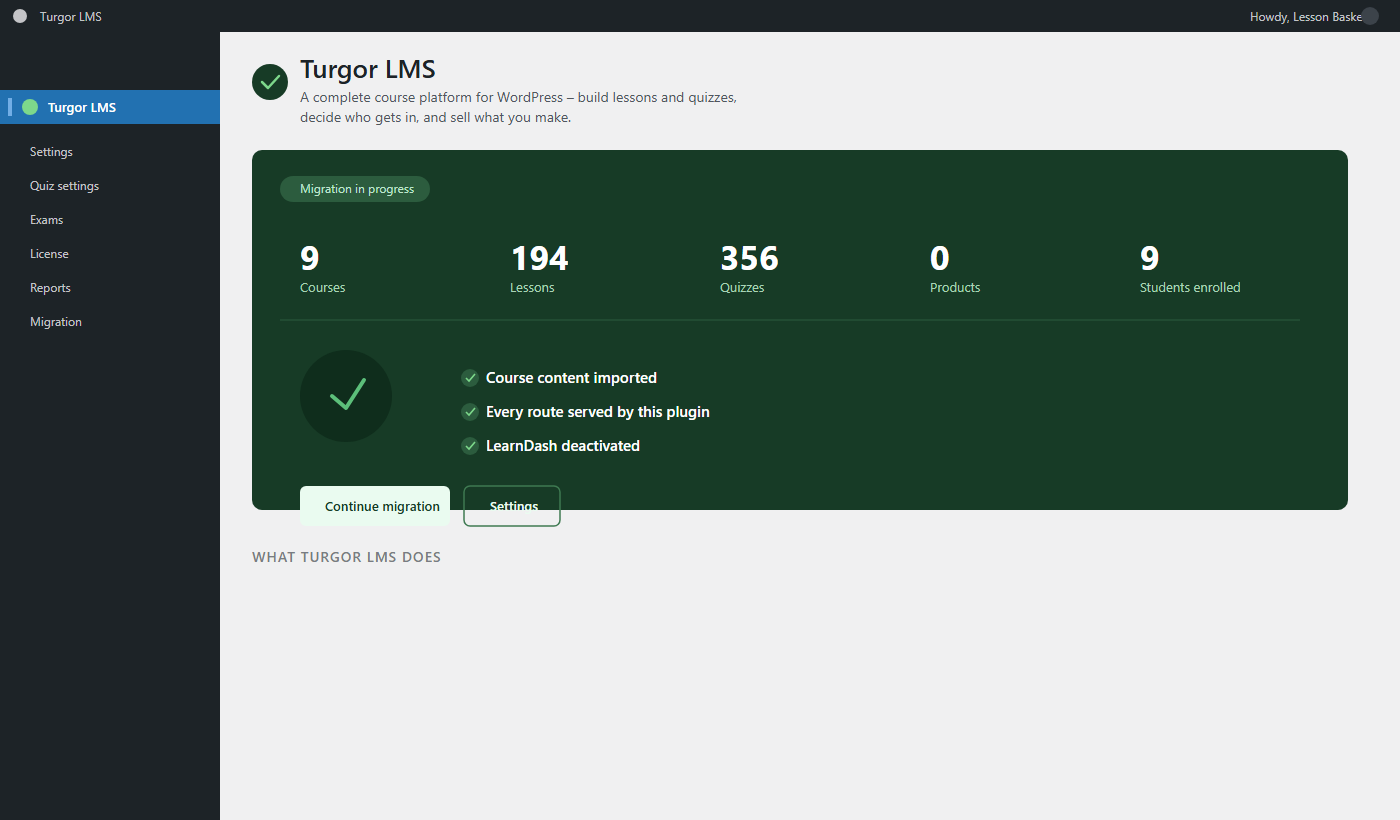
The admin overview
Migration status, course and quiz counts, and every route already served by the plugin — at a glance.
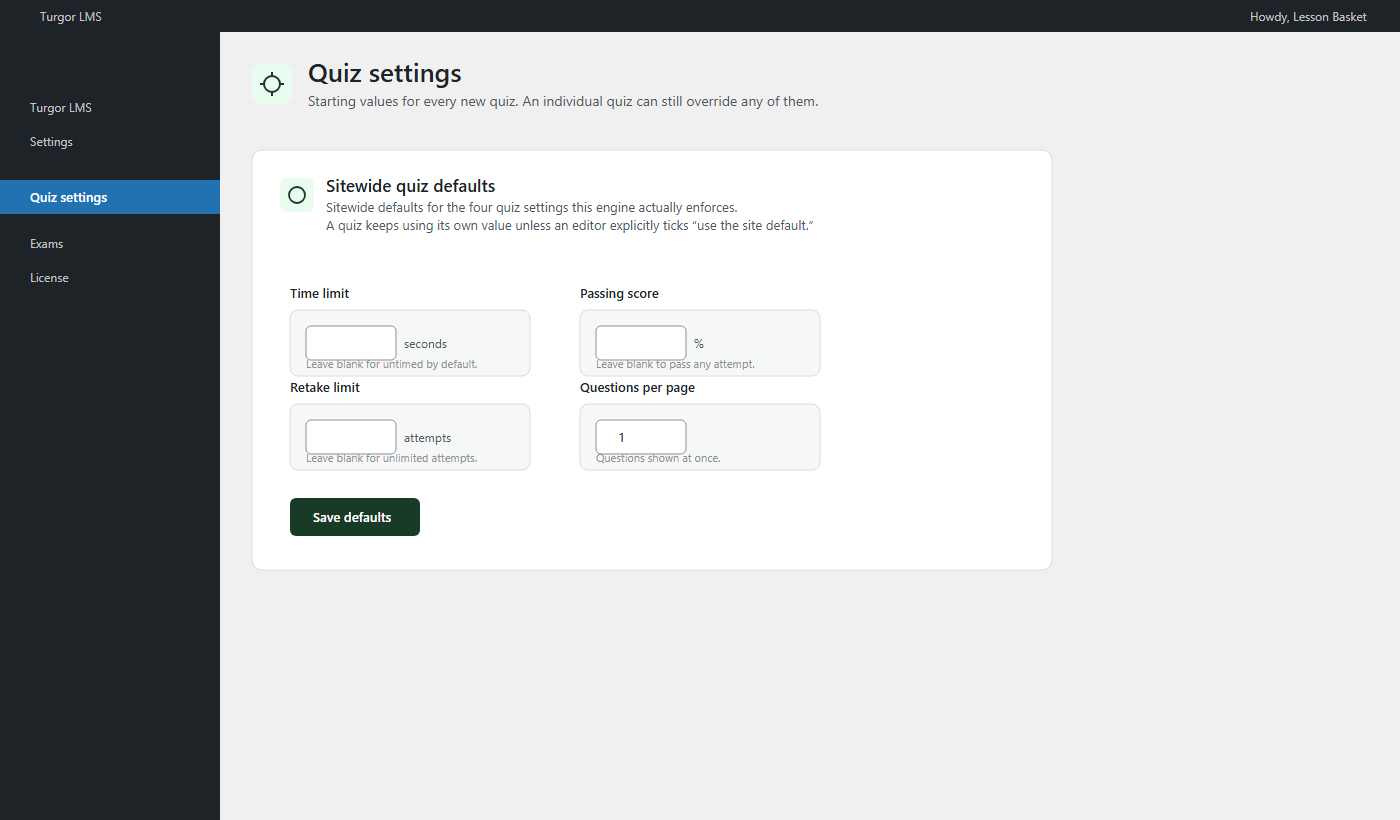
Sitewide quiz defaults
Set time limits, passing scores, retake limits, and pagination once — any quiz can still override them.
The screens your students actually use
Every screen below is native to Turgor LMS — progress tracking, courses, performance analytics, and the full timed-exam experience, all in one plugin.
Your score: -0.2% · Avg: -0.1%
| Test | Date | Score | Correct/Wrong | Skipped | Class avg | Percentile | Details |
|---|---|---|---|---|---|---|---|
| CSIR-NET Life Sci… | 4 Sept | -0.2% | 0 / 1 | 143 | -0.1% | 46th | TopicsReview |
| CSIR-NET Life Sci… | 4 Sept | -1% | 0 / 4 | 140 | -0.1% | 15th | TopicsReview |
| CSIR-NET Life Sci… | 4 Sept | 0% | 0 / 0 | 144 | -0.1% | 77th | TopicsReview |
| CSIR-NET Life Sci… | 4 Sept | 0.5% | 2 / 6 | 136 | -0.1% | 92nd | TopicsReview |
Same job, fewer plugins to buy
Everything in the left column ships in Turgor LMS by default. On LearnDash, most of the right column means installing — and paying for — another plugin.
| Feature | Turgor LMS | LearnDash |
|---|---|---|
| Pricing | One-time, from $59 | Annual license renewal |
| Course & lesson builder | Included | Included |
| Timed, sectioned exams | Built in | Requires a separate exam plugin |
| Per-topic negative marking | Built in | Requires a separate exam plugin |
| Student score & percentile dashboard | Built in | Requires a separate dashboard plugin |
| Bulk question import/export | Built in | Requires a separate plugin |
| Certificates | Included | Included |
| Class-level reporting | Built in | Limited, often needs an add-on |
| Guided migration from LearnDash | One-click import wizard | — |
| If your update window lapses | Every feature keeps working | Varies by add-on |
Competitive-exam tooling, built in
The same fullscreen lockdown and per-topic negative marking as Exam Mode — because it's the same engine, included by default.
Sectioned, timed exams
Assemble quizzes into one timed paper with topic tabs and a CBT-style question navigator.
Per-topic negative marking
Set a different penalty per section, matching how SSC, banking, and UGC/CSIR-NET papers actually score.
Student dashboard included
Scores, percentiles, streaks, and an activity heatmap — the dashboard sold separately as its own plugin, here by default.
Finish the loop, not just the quiz
Certificates and class-level reporting that come with the platform instead of needing a separate purchase.
PDF certificates, emailed automatically
Generated the moment a course is completed, and emailed to the student with no manual step.
Custom certificate design
Match your own branding instead of a generic template.
Class Reports
See how a whole class or cohort is doing, not just one student's dashboard at a time.
Question & answer shuffle
Randomize question order and answer order per attempt, so repeat sittings aren't identical.
No add-ons to buy. Ever.
Exam Mode, Student Dashboard, and Quiz Toolkit are each sold separately as their own plugins — $19 each. Turgor LMS ships with all three built in, at no extra cost.
Exam Mode
Fullscreen lockdown, sectioned timers, and per-topic negative marking — the exact same exam engine, included by default.
Student Dashboard
Scores, percentiles, streaks, and an activity heatmap for every student — no separate plugin required.
Quiz Toolkit
Bulk question import and export from Excel, Word, or a live Google Sheet — built into the same install.
with every Turgor LMS purchase — nothing else to buy.
One purchase. Every tier includes the full platform.
Analytics, exam tools, migration, and certificates ship in every tier — the only difference is how many sites you run it on. Just want to try it first? Download the free version.
Single Site
- Full Turgor LMS platform
- One-click LearnDash migration
- Updates & support included* — see offer above
- Keeps working after, no expiry
Agency Starter
- Everything in Single Site
- Use across up to 5 of your own or client sites
- Updates & support included* — see offer above
- About 63% less than 5 single-site licenses
Agency Unlimited
- Everything in Agency Starter
- Unlimited sites, including every client site you manage
- Priority support
- Renews annually
Single Site and Agency Starter are one-time purchases — no subscription. Agency Unlimited renews annually.
Questions before you install.
Do I need LearnDash installed to use Turgor LMS?
No. Turgor LMS is a complete, standalone course platform. LearnDash is only relevant if you're migrating an existing LearnDash site — Turgor LMS reads its data during migration, then LearnDash can be switched off.
What exactly moves over when I migrate from LearnDash?
Courses, lessons, quizzes, questions, categories, and student progress — including already-earned certificates. The importer verifies each course against your original LearnDash data before you go live, so nothing is copied and assumed correct.
Will this conflict with my caching plugin?
No. Turgor LMS is built to work alongside standard page-caching setups — dynamic content like quiz results and dashboards is excluded from the cache automatically, so you don't need to hand-configure exclusion rules.
Do I need to touch server settings to install it?
No. It installs like any WordPress plugin — no special PHP configuration, no elevated hosting tier required.
What happens to my existing exams and negative marking?
They migrate as-is, including section structure and per-topic negative marking if you're already using Exam Mode.
Is this the same team as Exam Mode, Student Dashboard, and Quiz Toolkit?
Yes — Turgor LMS is built by the same team, and includes the functionality of all three as part of the platform.
What happens after my included updates end?
Everything you've built keeps working exactly as it does today — a lapsed update window only means new versions stop until you renew (see the launch offer above for how long your update window is). Nothing already installed is disabled.
Trusted by coaching institutes running live mock tests
"Negative marking that actually matches the real exam format made our mock tests feel legitimate for the first time. Students stopped asking if the scores were 'real.'"
"We imported three years of banking and SSC question banks with Quiz Toolkit in an afternoon. That was a week of data entry before."
"The Student Dashboard alone changed how parents see us during admission counselling — it looks like a real exam portal, not a WordPress plugin."
Your students won't notice the migration. They'll notice the speed.
Pricing starts at $59, one time — see exactly what's included before you decide.
See Pricing